Groww + VolumeLens

Advanced Charts for Groww — Order Flow, Scanner, AI

Groww's charts are a basic TradingView embed. No scanner, no order flow, no footprint, no automated trailing. VolumeLens adds all of this on top of your Groww account. Keep your broker. Upgrade your tools.

Works with Groww + Zerodha. Keeps your existing account. Zero broker switch.

The Groww chart gap

Groww has become the second-largest retail broker in India thanks to a simple, clean onboarding and a mobile-first experience. For someone placing their first trade, it is friendly and approachable. For someone doing serious technical analysis, it is thin.

The charting is a standard TradingView embed — fine for drawing a trendline and watching a 50-EMA crossover, but missing almost everything a serious trader uses daily: proper scanning, volume profile, order flow, footprint, multi-timeframe dashboards, and automated risk management. If you want those, you either switch broker (painful) or add a specialised platform (smart).

VolumeLens is the smart route. Keep your Groww account. Link it to VolumeLens. Your positions, holdings, and orders sync in real time, and VolumeLens gives you the advanced layer Groww doesn't.

VolumeLens vs Groww Charts — head-to-head

CapabilityGroww ChartsVolumeLens
Basic candlestick chartsYesYes
Standard indicators (RSI, MACD, MA)YesYes
Drawing toolsYesYes
Multi-chart layoutsNoYes
Volume profileNoYes
Footprint chartsNoYes
DOM ladderNoYes
CVD (cumulative volume delta)NoYes
Stock scanner (55+ filters)NoYes
SEPA scannerNoYes
Chart trading (orders from chart)NoYes
AI analysisNoGemini-powered
Automated trailing stopNoYes
BacktestingNoYes
Trade planner with R:RNoYes

What VolumeLens adds on top of Groww

1. A real scanner

Groww doesn't have a scanner. You browse lists. VolumeLens gives you 55+ filters covering price action, volume, technicals, fundamentals, and F&O OI. Find the setup, click to chart, click to trade — all in Groww.

VolumeLens scanner with 55+ filters for Groww users

2. Order Flow — the professional-grade layer

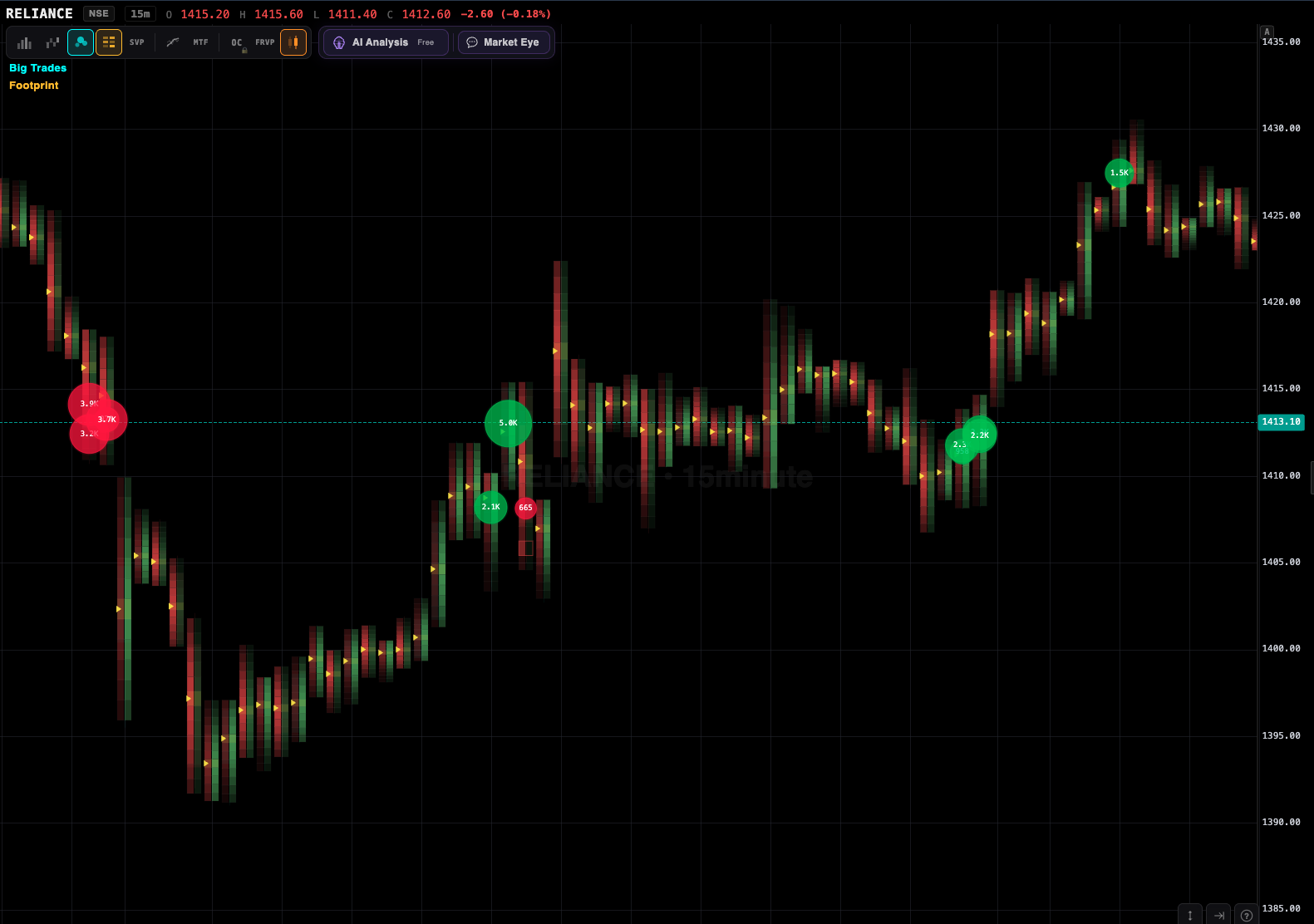
Footprint charts show exact buy vs sell volume at each price level. DOM ladder shows resting liquidity. Volume profile shows where real business gets done. CVD shows aggressive flow direction in real time. None of this exists on Groww. All of it is standard on VolumeLens.

Footprint chart for NSE stocks

3. AI Mentor

Click any stock and get Gemini-powered analysis that reads your Groww positions, understands Indian market context, and flags risks. "Your long HDFCBANK is exposed to Nifty Bank weakness today — consider tightening the stop" — actionable and position-specific.

4. Automated trailing stops on Groww

Set a trailing stop once. VolumeLens monitors price via Groww's feed and updates the stop via Groww's API as price moves in your favour. No babysitting, no forgotten GTT updates, no profits given back.

5. Chart trading

Click a price on the chart to place a limit order. Drag a line to modify. Right-click to place a stop. All routes to your Groww account. This is how professional traders have worked for decades — but Indian retail platforms never offered it. Until now.

Chart trading interface

Why not just switch brokers?

Some traders do. But switching brokers is annoying:

You don't need to switch. VolumeLens is broker-agnostic. Keep Groww. Add VolumeLens. Get the advanced layer without disrupting anything.

Who this is for

Groww intraday traders

Who need Order Flow, DOM ladder, and chart trading that Groww doesn't offer. Execution stays on Groww.

Groww swing traders

Who want proper scanning (SEPA, RS, breakout templates) and automated trailing stops for multi-day holds.

Groww F&O traders

Who need correct lot-size handling, OI tracking, option Greeks, and multi-leg strategy builder.

Learning traders

Who want AI-powered explanations of what the chart means and why the setup is valid.

Getting started with Groww + VolumeLens

  1. Sign up free at volumelens.com — takes 30 seconds, no credit card
  2. Go to Settings → Broker → Connect Groww
  3. Authorise via Groww's OAuth page
  4. Positions, holdings, and funds sync automatically
  5. Start scanning, charting, or placing orders — everything routes to your Groww account

If you don't have Groww yet but are considering, VolumeLens works equally well with Zerodha. Most of our users are on one of the two — we support both equally.

Frequently asked questions

Does VolumeLens work with Groww?

Yes. Full integration via Groww's API. Live position sync, order placement, holdings visibility, fund check.

Can I place Groww orders from VolumeLens?

Yes. Every order placed through VolumeLens routes to your Groww account. Same brokerage, same settlement, same tax treatment as if you placed it directly.

Does Groww support order flow?

No. Groww uses a basic TradingView embed with standard indicators. VolumeLens adds footprint, DOM, volume profile, and CVD — all absent from Groww.

Does Groww have a scanner?

Not really. Basic filters on its stocks page. No custom multi-condition scanning. VolumeLens provides 55+ filters with a visual builder.

Can I use VolumeLens without connecting a broker?

Yes. Scanner, charts, AI Mentor, and all analysis features work without a broker. You just can't place live orders until you connect Groww (or Zerodha).

Does VolumeLens charge extra on top of Groww?

VolumeLens has a free tier. Advanced features use pay-per-use coins. Groww's brokerage stays exactly the same — VolumeLens doesn't affect your broker charges.

Is my Groww data safe?

VolumeLens only accesses your Groww account via the official API with your consent. We don't store your Groww password. You can disconnect anytime from Settings.

What about Groww's mobile app?

VolumeLens is web-first with a responsive mobile layout. For mobile execution of simple orders, Groww's app is fine. For advanced charting and scanning on mobile, VolumeLens is the better experience.

Upgrade your charts without switching brokers

Order Flow, scanner, AI, and automated trailing — on top of your existing Groww account.