Chartink finds stocks and alerts you. Placing the trade happens somewhere else. VolumeLens scans, shows the order flow inside the candle, plans the position and places the order through a connected Zerodha or Groww account — in one place.
Chartink is one of India's most widely used stock screeners, with a point-and-click scan builder, charts, alerts and a large library of public scans. What it does not do is trade: there is no broker connection and no order placement.
So a Chartink scan is usually the start of a routine — open the broker app, look at the chart again, work out the position size, place the order, then set a stop separately. VolumeLens keeps those steps in one place: scan, read the footprint and volume profile, plan the trade and place it through a connected broker.
| Capability | Chartink | VolumeLens |
|---|---|---|
| Stock coverage | NSE stocks and indices | About 2,000 NSE stocks |
| Scan builder | Point-and-click clauses, no scripting | Point-and-click, 55+ filters |
| Charts | Yes (intraday timeframes on Premium) | Yes, with order flow |
| Alerts | SMS, email and webhook (custom alerts on Premium) | In-app, push and Telegram |
| Footprint / order flow | No | Yes |
| Volume profile | No | Yes |
| AI chart analysis | No | AI Mentor, with voice |
| Place orders | No (alerts can feed third-party tools via webhook) | Through connected Zerodha or Groww |
| Trailing stop / GTT OCO | No | Yes, on connected accounts |
| Chart trading | No | Yes |
| Trade planner | No | Yes |
| Backtesting | Lists which stocks triggered and when | Scanner strategy backtest with win rate, drawdown, profit factor and equity curve |
| Pricing | Free plan (5-minute delayed data); Premium ₹780/month | Free features + pay-per-use coins |
Chartink details are from Chartink's own pages as of September 2026 (scanner guide, FAQ). Verify current plans with Chartink.
If scanning alone is the job, Chartink does it well. VolumeLens is for traders who want the next steps — order flow, planning and order placement — in the same place.
Filters for price action, volume, moving averages, RSI, MACD, ADX, Bollinger Bands, candlestick patterns, relative strength, delivery percentage and SEPA-style trend templates. Build conditions by clicking, save your scans and turn on alerts.

Open a result and see what happened inside the candle: footprint buy and sell volume at each price, cumulative volume delta, session volume profile and a depth ladder. You can see whether a breakout candle traded on strong or weak buying.
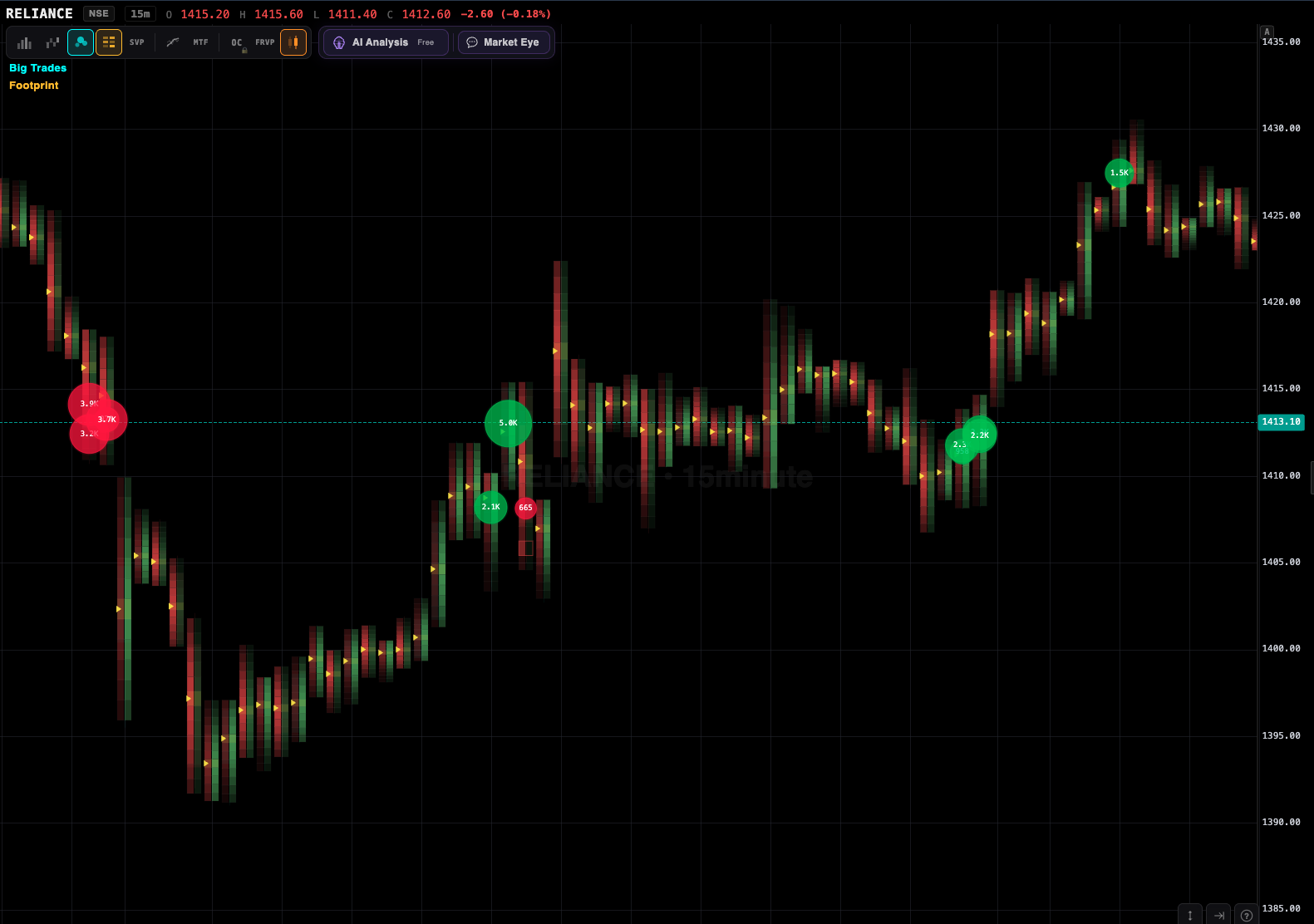
AI Mentor describes a chart in plain language or voice — trend, volume levels and order flow — and, with a connected broker, can take your open positions into account. It explains the data; it does not recommend trades.
Open the trade planner with the symbol filled in. Choose a quick order, a signal-based plan, or a step entry of two or three staged entries; set your own stop and target; and place the order through your connected broker. GTT OCO and optional trailing stops are managed afterwards.
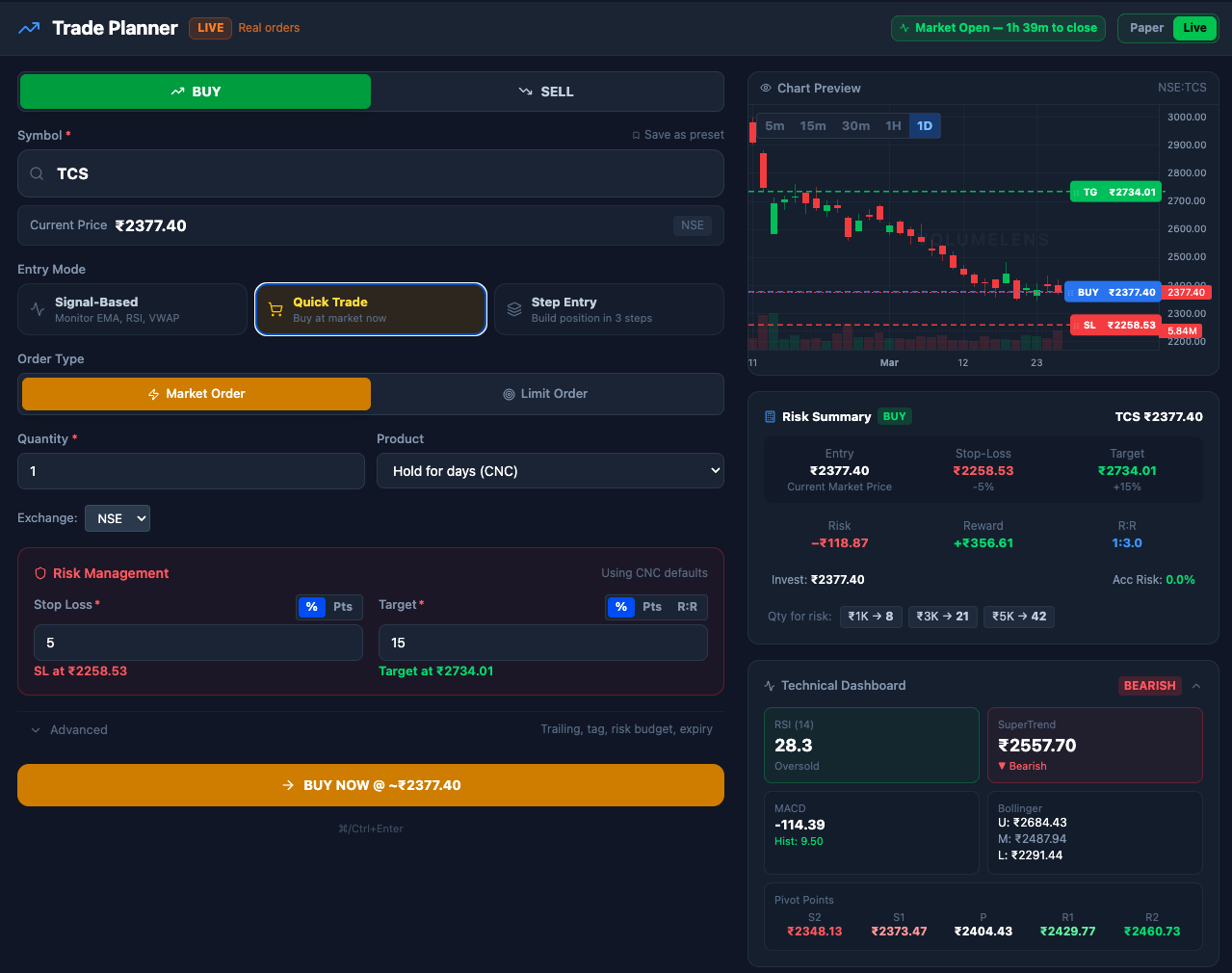
The scanner, charts, order flow and AI analysis work without a broker account. Connect Zerodha or Groww only when you want to place orders.
SEPA and relative strength scans, step-entry planning, and trailing stops for multi-day positions.
Footprint, CVD, volume profile, a depth ladder and chart trading.
F&O lot sizes, open interest data, index F&O order flow and GTT OCO on connected accounts.
Trailing stops and GTT OCO manage stops on a connected account, with every update logged.
Partly. The public scanner, charts, watchlists and trade planner are free; with an account, scans, order flow sessions and AI features use pay-per-use coins, and new accounts get their first scan free. Chartink has a free plan with 5-minute delayed data and a Premium plan listed at ₹780 a month.
About 2,000 NSE-listed stocks, including F&O stocks with lot sizes, with filters for sector, market cap and delivery percentage. Chartink covers NSE stocks and indices.
Yes, through Kite Connect. You log in through Kite, the session token refreshes daily, and you can place orders from the scanner, chart or trade planner. Groww is also supported. Chartink does not place orders.
No. Both VolumeLens and Chartink build scans with point-and-click conditions — no scripting needed.
Yes. Saved scans can run during market hours and notify you in-app, by push or on Telegram when a stock newly matches. Alert monitoring uses coins.
VolumeLens backtests scanner strategies on historical daily data and reports win rate, maximum drawdown, profit factor and an equity curve. Chartink's backtest lists which stocks triggered and when.
No. VolumeLens is a screening and analysis tool, not a SEBI-registered investment adviser, and it does not recommend trades. Every decision stays with you.
Recreate them with the visual filters. Common conditions — moving average crossovers, RSI levels, volume versus average, 52-week highs — map directly to VolumeLens filters.
Start with the free public scanner — no account needed.